
The Subscribe block provides forms for both subscribing to and cancelling newsletters subscriptions.
Using this form, unsubscribed users and visitors can sign up for newsletters, while existing subscribers, users and visitors can cancel their subscriptions.
The block supports the following attributes:
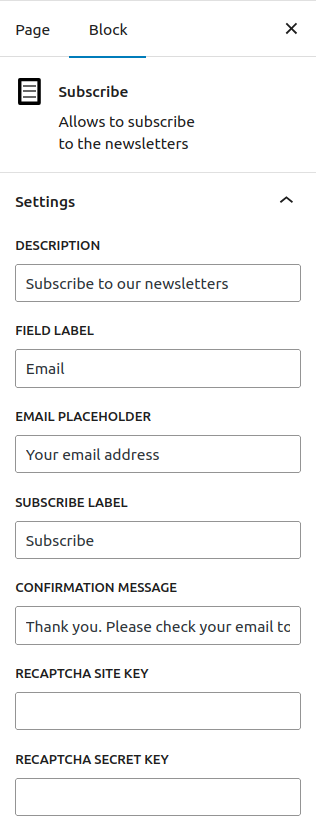
- Description: Text description of the form.
- Field Label: Label text for the email field.
- Email Placeholder: Placeholder text for the email field.
- Subscribe Label: Button text for the subscribe button.
- Confirmation Message: Confirmation text after subscribing.
- ReCAPTCHA Site Key: When used in combination with ReCAPTCHA Secret Key, requires validation through Google’s ReCAPTCHA v2, to complete the form.
- ReCAPTCHA Secret Key: When used in combination with ReCAPTCHA Site Key, requires validation through Google’s ReCAPTCHA v2, to complete the form.
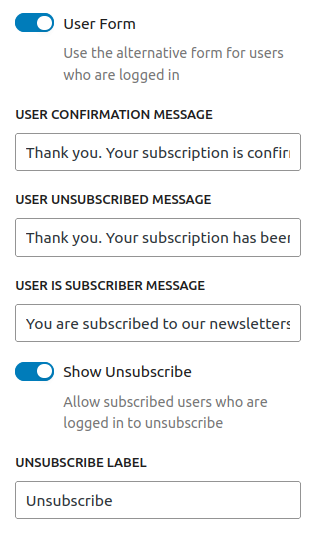
- User Form: When enabled it will render a subscription form without the email field, for authenticated users.
- User Confirmation Message: Text message displayed after a subscriber has confirmed the subscription.
- User Unsubscribed Message: Text message displayed when a user subscribes to newsletters.
- User is Subscriber Message: Text message displayed when a user is already a subscriber.
- Show Unsubscribe: Allow subscribed users who are logged in to unsubscribe.
- Unsubscribe Label: Button text for the unsubscribe button.
Note: ReCAPTCHA validation can be enabled using the dedicated fields in Subscribe block as described above, or using the constants GROUPS_NEWSLETTERS_RECAPTCHA_SECRET_KEY and GROUPS_NEWSLETTERS_RECAPTCHA_SITE_KEY as described in the API section for these constants.